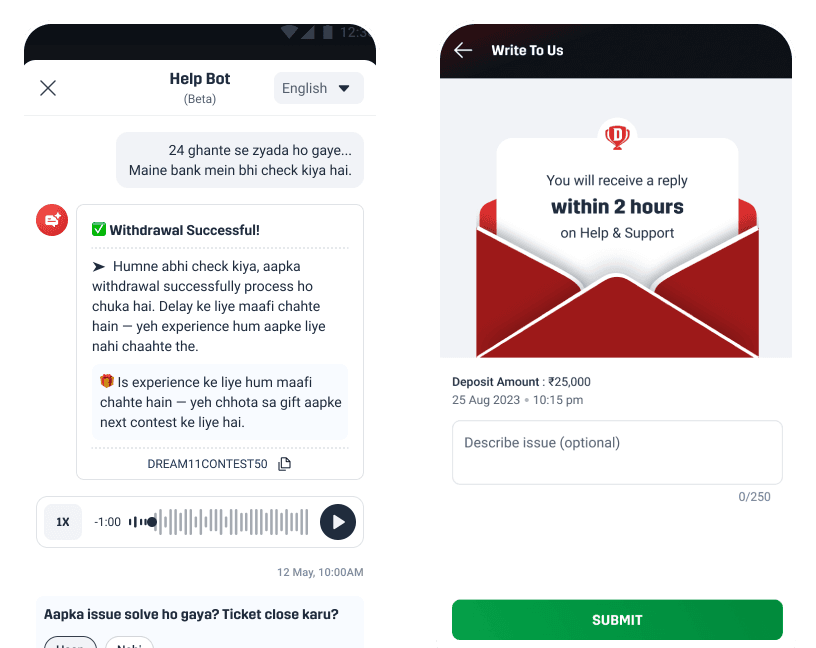
Dream11 (India's largest fantasy sports platform with 250M+ users) processes millions of deposits and withdrawals in the 30-minute window before IPL match start times. Many Indian banks run end-of-day batch processing during the same window, causing payments to stall or fail. Users had no in-app way to know if their money was safe. The only path to answers was a six-step support journey that could take hours to resolve during peak load.
I mapped every CS touchpoint across the app, simplified the ticket-raising flow, and embedded contextual support directly onto payment screens. We then ran a GenAI chatbot POC with bilingual voice and text support to validate AI-assisted resolution for account and verification issues. The work established the design foundation for a fully automated, intent-aware CX system.
160% increase in support adoption for users facing transaction issues
7.6% improvement in verification success via the GenAI chatbot
26% improvement in CSAT
13% reduction in support tickets
I owned the UX and UI for the chatbot POC, the motion design and UI for the ticket-raising flow, and the full CX audit that mapped agent workflows, information architecture, and automation opportunities. I personally interviewed CS agents, sat in on live support calls, and translated those operational insights into a long-term AI CX vision that the team built toward
Dream11 is a fantasy sports platform where users build virtual teams for real cricket, football, and kabaddi matches and compete for cash prizes. During IPL (India Premier League, India's biggest cricket tournament) season, the platform sees its highest traffic of the year. Millions of users deposit money and join contests in the 30 minutes before a match starts.
Indian banks run their EOD (end-of-day) batch processing around 7–8 pm, the same window as match kickoffs. When these overlap, transactions stall. For users, money is the most sensitive part of the app. The moment a payment shows "pending," the first question is: "Is my money safe?"
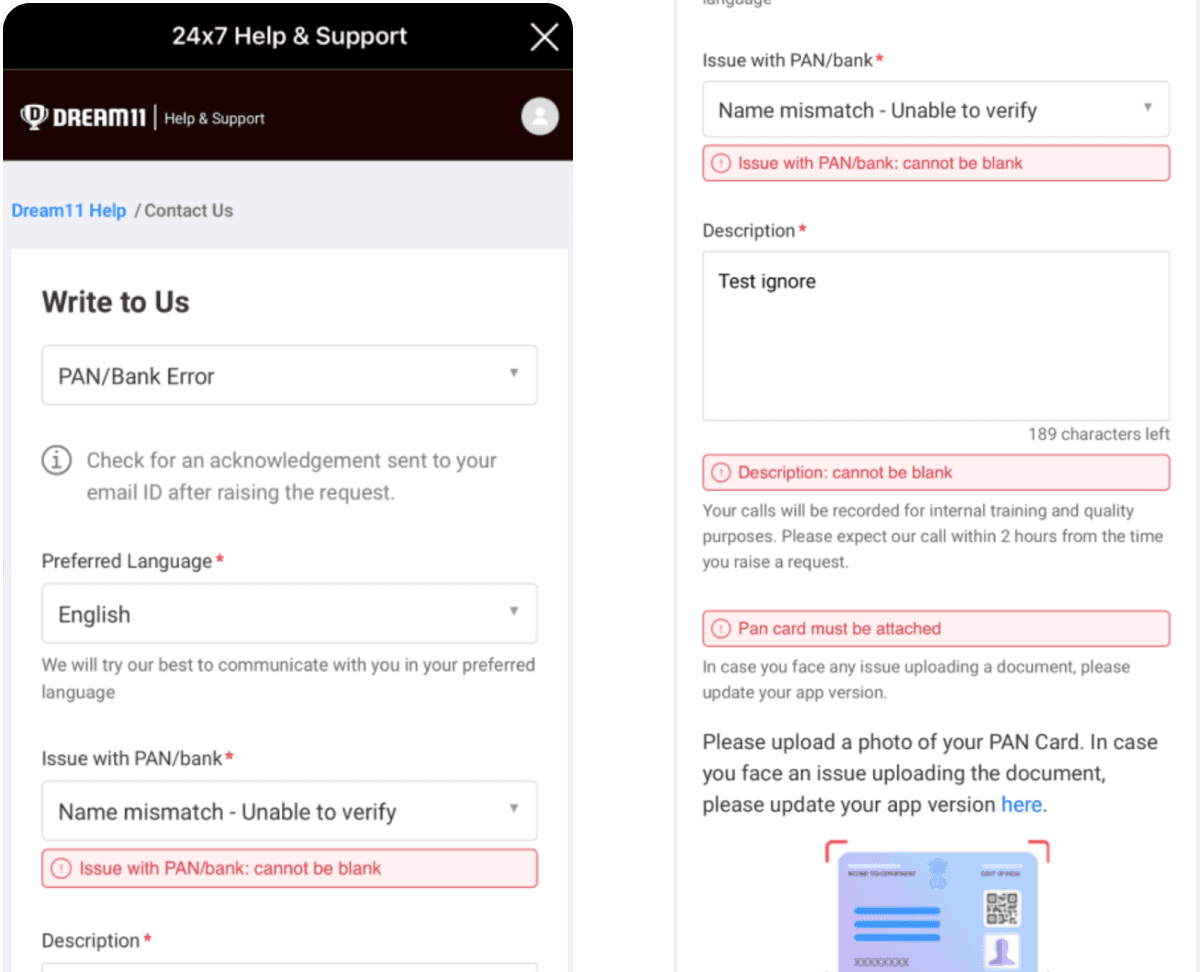
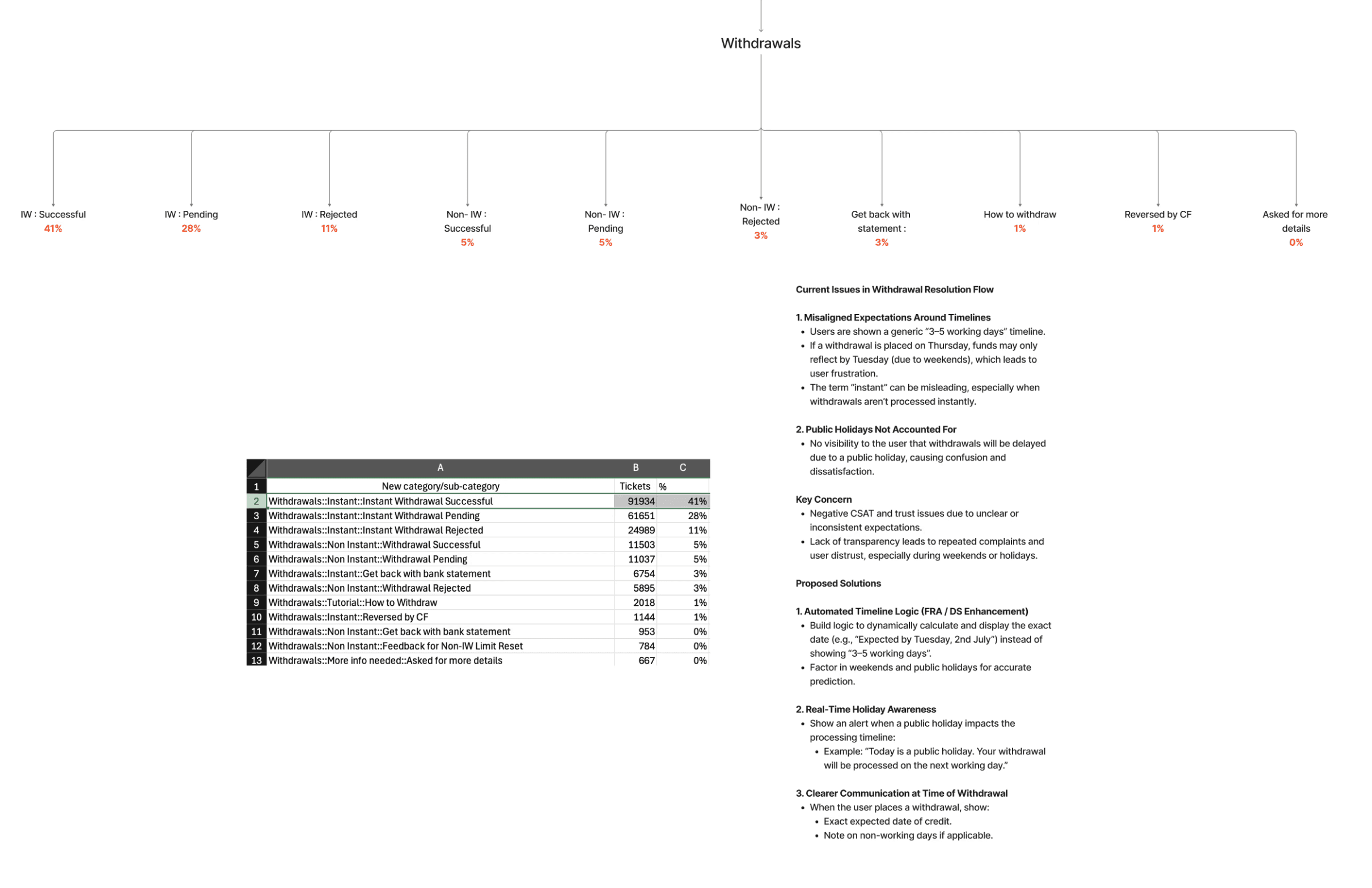
The existing support journey gave them no fast answer. Users had to: open the side navigation, go to Help & Support (a separate web view), log in again, land on an FAQ page, fill a long form with multiple dropdowns, raise a ticket, and then wait for an agent reply. During peak IPL hours, this meant waiting several hours. It created anxiety, repeat tickets, and a surge in CS load exactly when the team could least handle it.
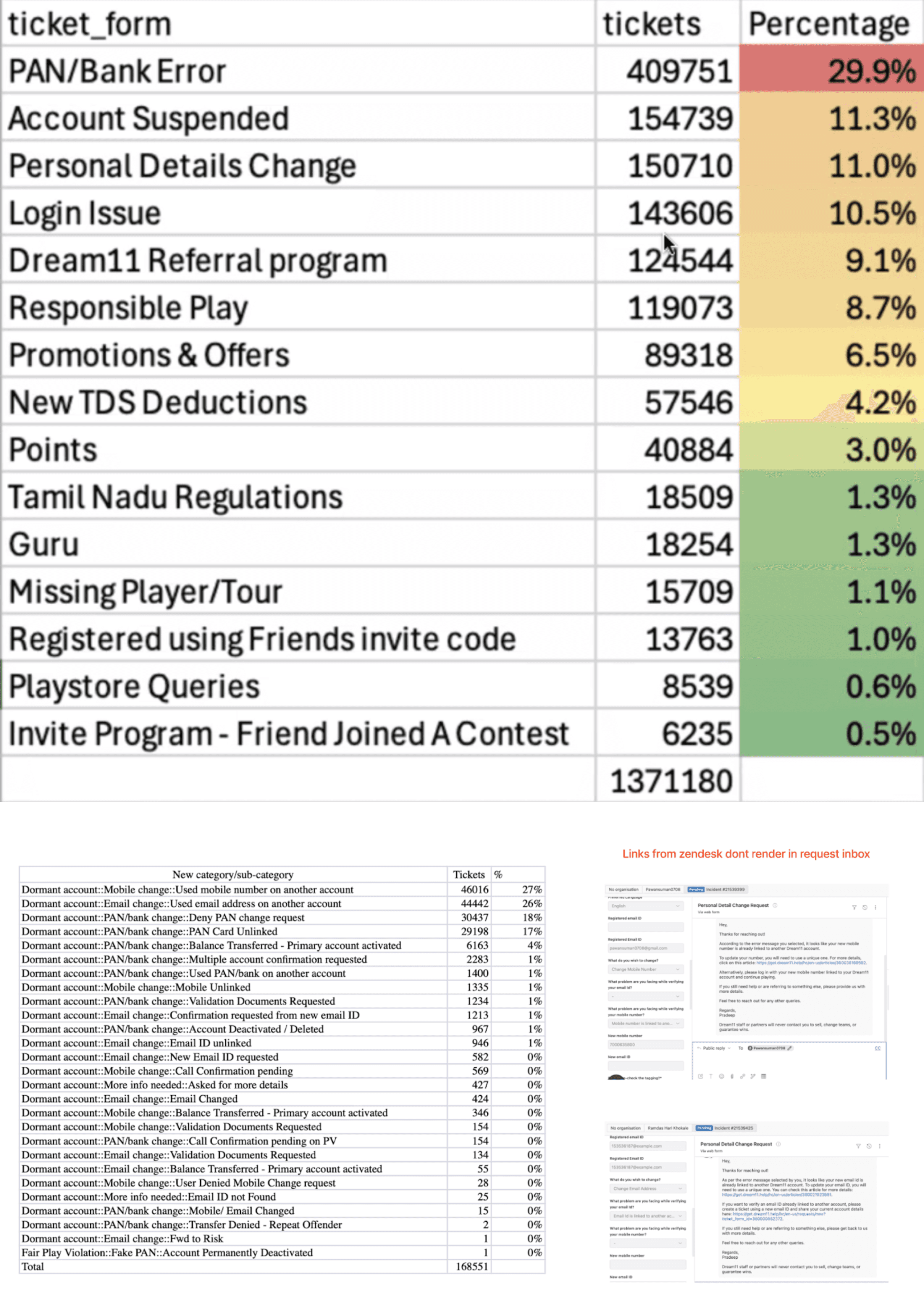
To map the real problem, I spent time embedded with the CS team, observing calls and reading through high-volume ticket categories before touching any design.
I found three core issues:
Ticket categories were duplicated:
Long Zendesk forms created ambiguity, so users filed the same issue under multiple categories. Agents spent time triaging duplicates instead of resolving issues.In-app communication was broken at the front-end level:
Links shared via Zendesk did not render inside the Dream11 inbox, so critical information never reached users.First Response Automation (FRA) messages:
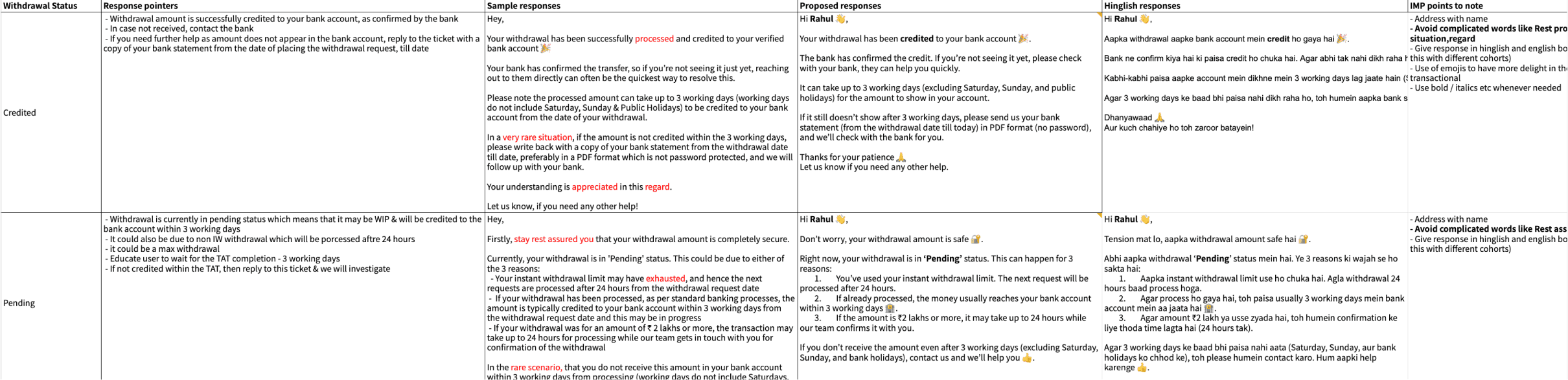
The auto-replies users received immediately after filing a ticket, were written in technical language. Users couldn't understand them and filed follow-up tickets assuming nothing had happened.
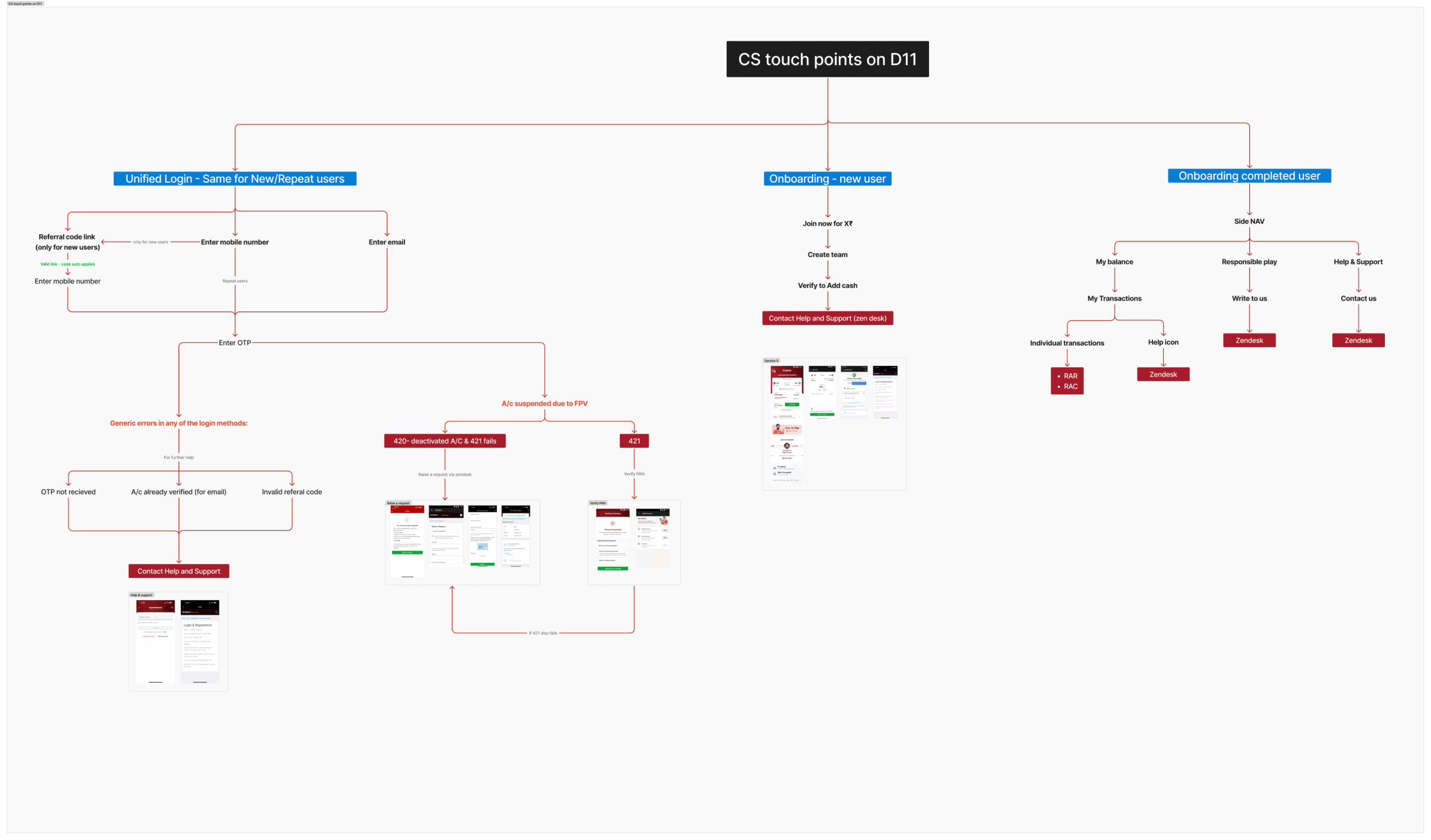
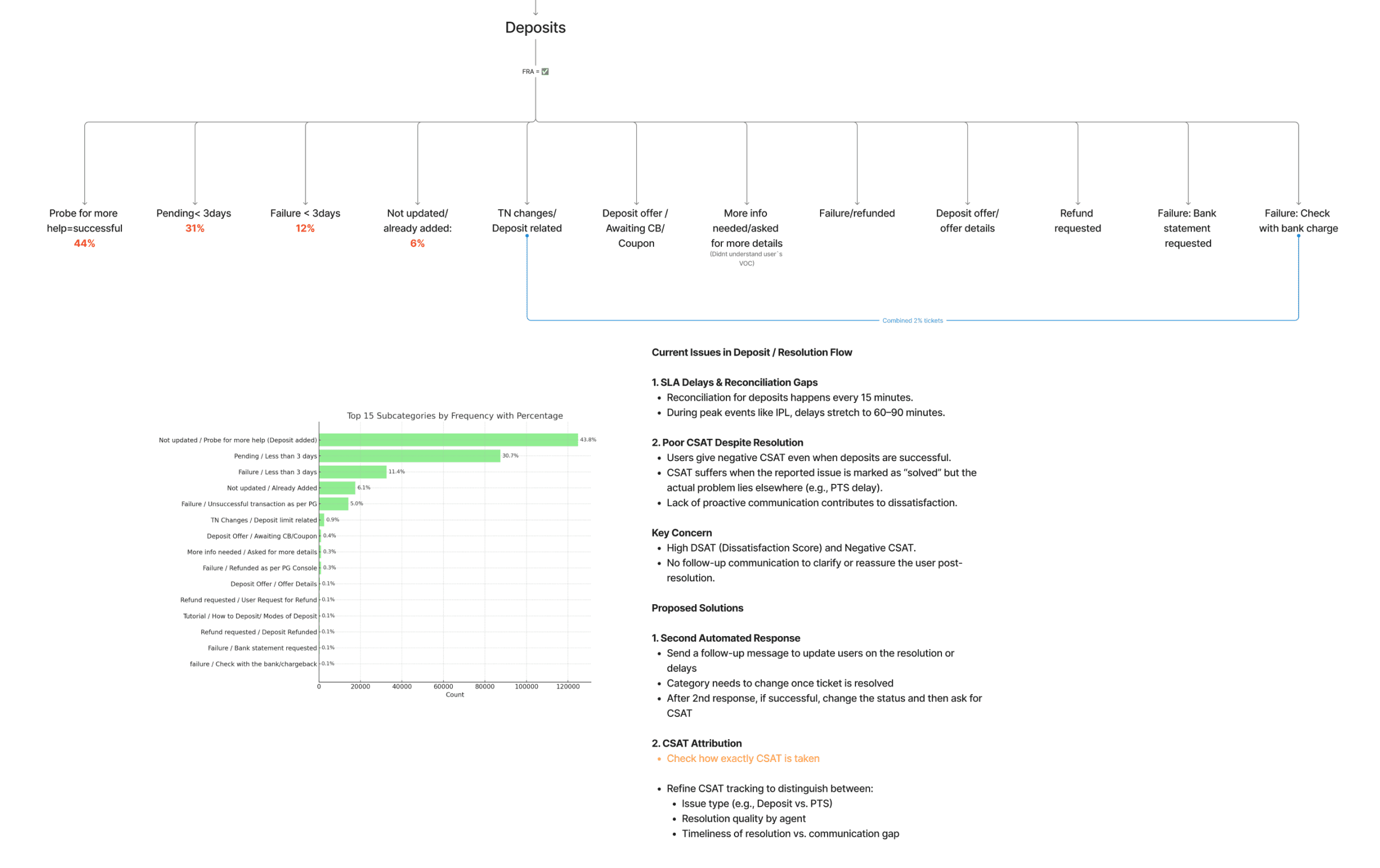
I documented every CS touchpoint across the app and created IA (information architecture) maps for each top-level support category: Withdrawals, Deposits, Dormant Accounts, Verification, and Account Management. I also rewrote the FRA templates into plain, reassuring language users could actually understand.

FRA copy recommendations
Competitive Analysis
We studied chatbot and support systems across real-money gaming products and high-volume consumer apps including Uber, Swiggy, and Zomato. We benchmarked conversational flow structure, voice feature adoption, quick-reply chip design, and gratification moments when issues were resolved. The key insight: users expect support to feel as fast as the rest of the app. Anything that feels like a form is friction.
User Insights
Through user calls and CS ticket analysis, a pattern emerged for the biggest non-payment ticket category: account recovery. Many tier-2 and tier-3 users (users in smaller Indian cities, often less digitally fluent) change their mobile numbers frequently. When they return to Dream11 after months away, their old number is deregistered and their PAN (India's national tax identification card, required for withdrawals on gaming platforms) is linked to a dormant profile. This creates an account conflict that users cannot resolve themselves.
These users were filing tickets repeatedly because the existing support flow gave them no resolution path. They needed a guided, step-by-step flow, not a form.
As a team, we embedded ticket creation and call-back options directly on payment failure screens, removing the six-step navigation entirely. When a payment failed or stalled, users saw a contextual support entry point right on that screen. We also added a call-back option (RAC: Request a Call) as an alternative to chat-based ticketing, so users with lower text comfort or urgent issues could request an agent call directly.
I owned the motion design across payment confirmation, failure states, and the ticket creation flow, using animation to signal system activity, reduce anxiety during the wait, and make the experience feel alive rather than frozen.
With payment support improved, we turned to the next highest-volume ticket category: account verification and dormant account recovery. Many tier-2 and tier-3 users change their mobile numbers frequently and return to Dream11 months later to find their PAN (India's national tax identification card, required for withdrawals on gaming platforms) linked to a deregistered profile. They had no self-serve resolution path. Every conflict became a ticket.
We designed and launched a chatbot POC focused on three categories: Verification, Dormant Accounts, and Suspended Accounts.
The bot appeared contextually. If a user hit a PAN verification failure screen, a bottom sheet surfaced with quick-reply chips relevant to that exact failure. The user did not navigate to a separate support section. The support came to them.
Bot replies were delivered as Hindi audio translations alongside the text, making the experience accessible to users more comfortable hearing information in their native language than reading it in English. This audio support had existed in the old Zendesk webview but was buried inside FAQ pages where almost no one found it. I made the call to bring it upfront and surface it contextually at the exact moment a user hit a failure state. User response to the audio component was strongly positive. I also added a prominent mic entry point so users could speak their query instead of typing, though voice input saw only 2–3% adoption compared to 30–40% for quick-reply chips.
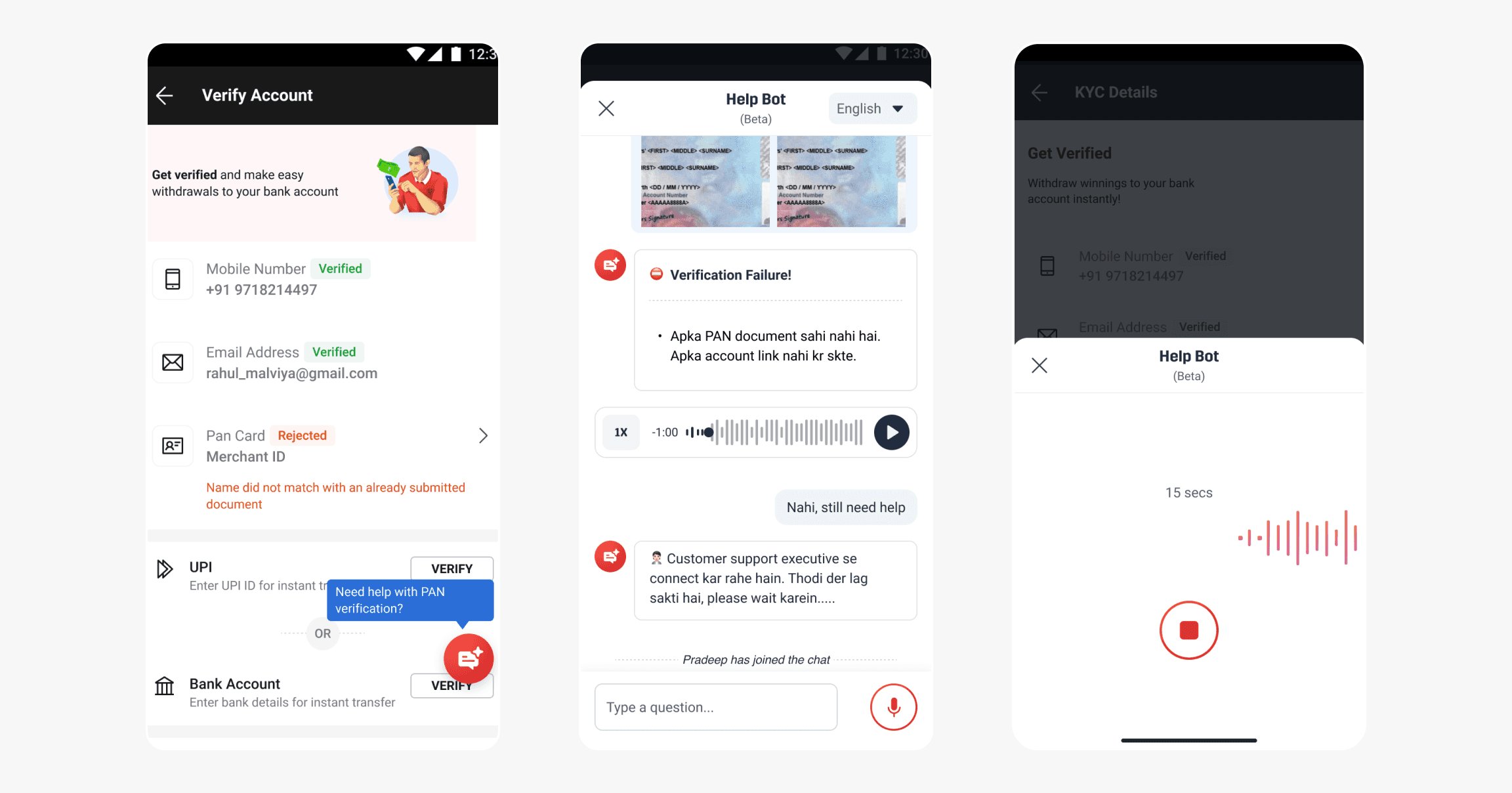
The mic adoption gap was the biggest signal. Users were comfortable tapping chips. They were not comfortable speaking, at least not in a support context on a financial app. That gap shaped everything we recommended building next.
The POC validated that contextual, in-app support works. It also showed us the limits of a one-way bot. We designed a long-term vision for a fully conversational CX system that would replace the Zendesk form entirely.
In this vision, users tap a chip like "PAN failed" or "money not received." The bot understands intent, walks them through a resolution path, and automatically raises a ticket if the issue requires an agent. Agents are freed from low-complexity, repetitive queries. Support feels like a conversation, not a form.
The modular UX components we designed could unify all help touchpoints under a single interface. One entry point. One consistent experience. No re-login. No navigation.
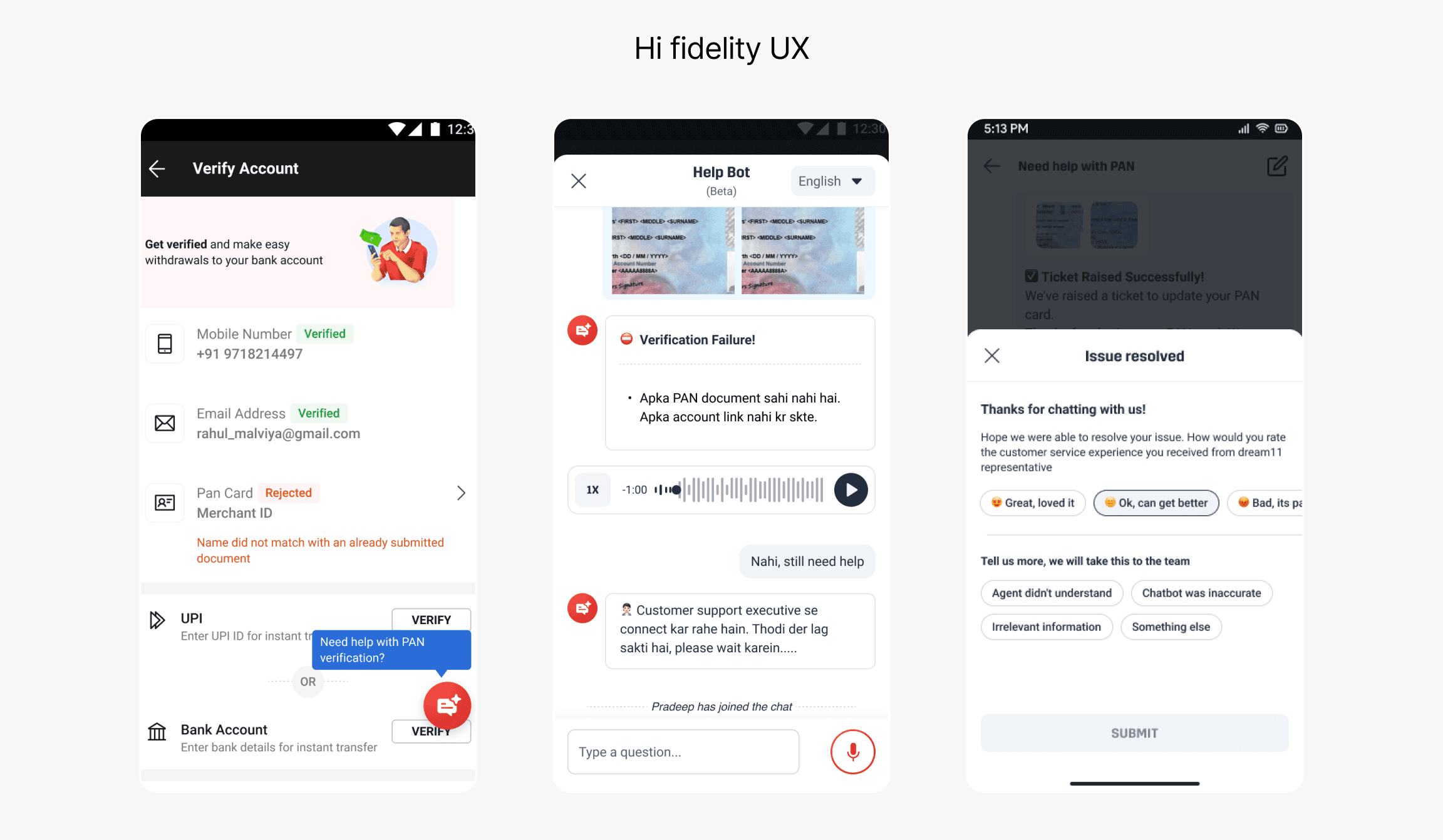
Across both phases, the work shifted support from a reactive, form-heavy process to a contextual, in-app experience. Phase 01 reduced friction at the payment layer. Phase 02 proved that AI-guided support could resolve account issues without an agent. Together they laid the foundation for a fully conversational CX system that the team continues to build toward.
The biggest surprise was the voice feature. We assumed that bilingual voice support would resonate strongly with tier-2 and tier-3 users who are more comfortable in Hindi than English. It landed at 2–3% adoption. Quick-reply chips, which require no audio at all, landed at 30–40%. That gap taught me something I will carry into every AI project: do not design for what users should want. Design for what they are actually comfortable with. If I were starting again, I would spend more time upfront researching how these users interact with voice features in other apps they already use, understand the hesitation, and then decide whether to build voice at all.
The deeper lesson for AI product design: when you are building for mass-market audiences, simplicity is not a compromise. It is the strategy. Users do not need to know there is AI behind the experience. They just need it to work instantly and feel familiar. Overcomplicating the experience, even with well-intentioned features, can make users feel excluded rather than helped. Good design, with or without AI, should always lower the barrier. Never raise it
View case study